
Mirror2Go1.1 - App Store
You'll be able to see results in few seconds.
Publisher Description
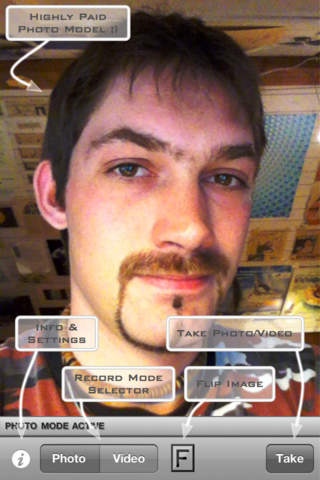
Mirror2Go is your personal & handy pocket mirror when you are on the go!
Check your look before your date arrives or you are entering an interview, refresh your make up in the dark street in front of the club, check your teeth after lunch,...
Mirror2Go uses the built-in front camera of your device to present you a mirror image of yourself - you can even flip the mirror image so you'll see how others see you:
'Mirrored F Button' - A normal mirror like the one in your bathroom.
'F Button' - A 'flipped' mirror; this is how another person sees you - think of a photo of you.
For a more detailed view you can pinch the mirror image to zoom in and out:
One-Finger Double-Tap the screen to double the zoom factor.
Two-Finger Single-Tap the screen to reset zoom factor.
For low-light situations there's our proprietary LightBar technology which shines on your face. This enables you to have a clear mirror image even in the darkest environments (e.g. club, street at night, etc.):
One-Finger Single-Tap the screen to show/hide the Light Control.
Off Button: Hide all LightBars (Light OFF).
Two Bar Buttons: Two LightBars in horizontal/vertical direction (50% Light).
Square Button: Four LightBars in horizontal and vertical direction (100% Light).
Maybe you want to shoot a picture of yourself for your sweetheart, keep a group picture of that cool bar tour? Mirror2Go also offers you recording functionalities:
Photo Mode: Hit the 'Take' button to shoot a picture of you. It is previewed to you and you can decide if you want to save the image to your Photo Library.
Video Mode: Hit the 'Record' button to start recording (Default: max. 10 minutes); the button changes its caption to 'Stop'. Hit the 'Stop' button to stop recording; the movie is saved to your Photo Library automatically.
As already mentioned: Mirror2Go is YOUR handy pocket mirror! This means that you can personalize the app to fit your needs:
Max. Video Duration: Set a max. video recording duration between 5 seconds and 60 minutes.
Light Color: You can choose from five different colors for the LightBars.
UI Tint Color: You can choose from seven different colors for the user interface tint.
----
Check out the Mirror2Go review at nerdvana.it --> http://www.nerdvana.it/2011/10/28/recensione-mirror2go-lo-specchio-che-ti-aspetti/
Requires iOS 4.0 or later. Compatible with iPhone 4, iPhone 4s, iPhone 5, iPhone 5c, iPhone 5s, iPhone 6, iPhone 6 Plus, iPhone 6s, iPhone 6s Plus, iPhone SE, iPhone 7, iPhone 7 Plus, iPad 2 Wi-Fi, iPad 2 Wi-Fi + 3G, iPad Wi-Fi (3rd generation), iPad Wi-Fi + Cellular (3rd generation), iPad Wi-Fi (4th generation), iPad Wi-Fi + Cellular (4th generation), iPad mini Wi-Fi, iPad mini Wi-Fi + Cellular, iPad Air, iPad Air Wi-Fi + Cellular, iPad mini 2, iPad mini 2 Wi-Fi + Cellular, iPad Air 2, iPad Air 2 Wi-Fi + Cellular, iPad mini 3, iPad mini 3 Wi-Fi + Cellular, iPad mini 4, iPad mini 4 Wi-Fi + Cellular, 12.9-inch iPad Pro, 12.9-inch iPad Pro Wi-Fi + Cellular, 9.7-inch iPad Pro, 9.7-inch iPad Pro Wi-Fi + Cellular, iPod touch (4th generation), iPod touch (5th generation), and iPod touch (6th generation).
About Mirror2Go
The company that develops Mirror2Go is Dave Schottl. The latest version released by its developer is 1.1.
To install Mirror2Go on your iOS device, just click the green Continue To App button above to start the installation process. The app is listed on our website since 2010-11-10 and was downloaded 0 times. We have already checked if the download link is safe, however for your own protection we recommend that you scan the downloaded app with your antivirus. Your antivirus may detect the Mirror2Go as malware if the download link is broken.
How to install Mirror2Go on your iOS device:
- Click on the Continue To App button on our website. This will redirect you to the App Store.
- Once the Mirror2Go is shown in the iTunes listing of your iOS device, you can start its download and installation. Tap on the GET button to the right of the app to start downloading it.
- If you are not logged-in the iOS appstore app, you'll be prompted for your your Apple ID and/or password.
- After Mirror2Go is downloaded, you'll see an INSTALL button to the right. Tap on it to start the actual installation of the iOS app.
- Once installation is finished you can tap on the OPEN button to start it. Its icon will also be added to your device home screen.
Program Details
System requirements
Download information
Pricing
Version History
version 1.1
posted on 2010-11-10
Disclaimer
Official App Store Link
We do not host Mirror2Go on our servers. We did not scan it for viruses, adware, spyware or other type of malware. This app is hosted by Apple and passed their terms and conditions to be listed there. We recommend caution when installing it.
The App Store link for Mirror2Go is provided to you by apps112.com without any warranties, representations or guarantees of any kind, so access it at your own risk.
If you have questions regarding this particular app contact the publisher directly. For questions about the functionalities of apps112.com contact us.
